

The search tool
An assistant does not talk to the search engine directly. It calls one built-in tool, search, with the
user's request in their own words — no query syntax, no filter names, no field names. The translation
into a real SearchRequest happens inside the tool, through a dedicated interpreter agent that first asks
the engine what can actually be filtered in this workspace, for this user.
search is an in-code built-in: available to all users, selectable in the assistant and agent tool
pickers, and enabled on the default assistant. In the chat composer it is not offered under that name —
see In the tool picker it is one entry.
It is not editable.
What one call does
- Interpret. The tool runs the built-in
InterpretSearchagent. Its system prompt carries the query syntax and filter examples, with${VISIBLENODETYPES}and${TODAY}substituted per run — which data types are searchable depends on the calling user's access rights, and without today's date "last quarter" cannot become a range. - Consult the real filters. The agent's only tool,
consult-filters, runs an empty search as that user and reports the filters that really exist, with their values and counts. Nothing is invented: the agent may only use names and values it saw there. It may call this once — a second call in the same interpretation is refused outright, because a model handed the same list again reads it as progress and loops. - Answer under a schema. The agent replies under a strongly-typed output schema —
{ query, filters[], explanation }. - Search. The tool reverses the filter names back into a real
SearchRequest(every LLM filter is a pre-filter, so the facet counts describe the filtered result set), runs it as the user, and returns the interpretation, the first page of results and the facet breakdown.
In a chat the call appears as one chip. Expanded, it lists the interpreter agent's own steps under the call.
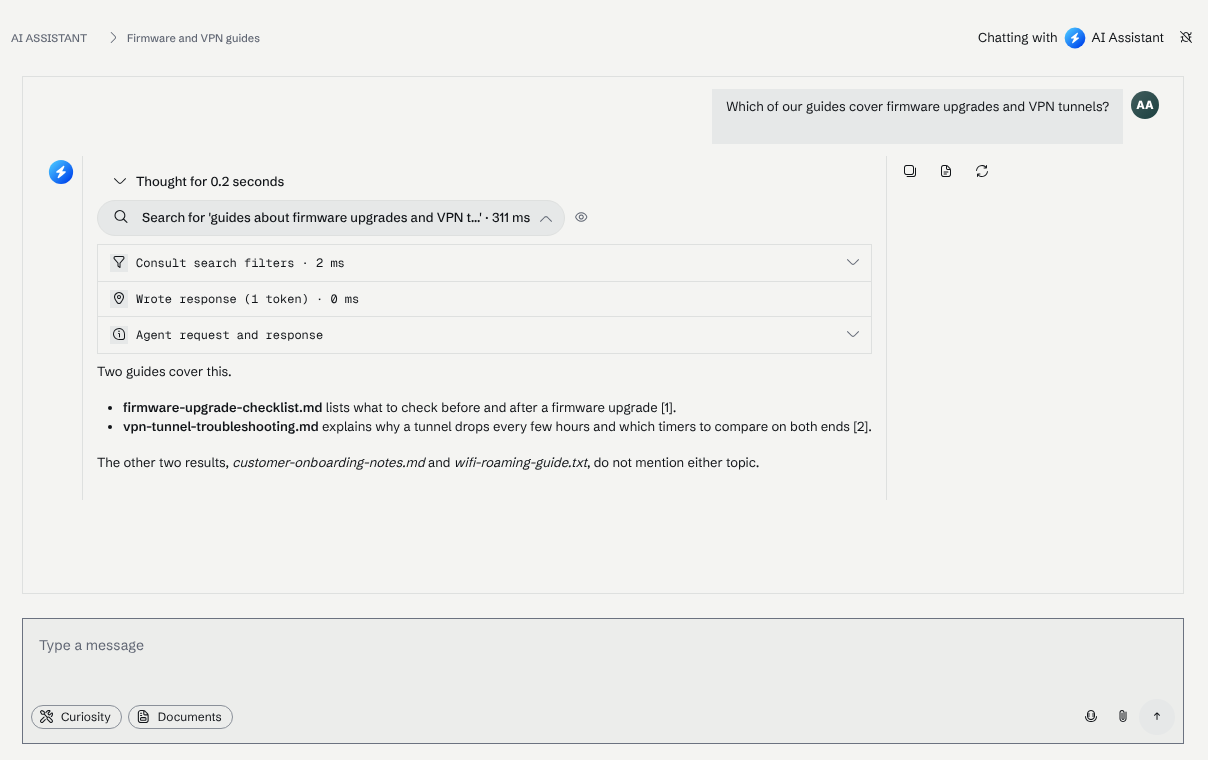
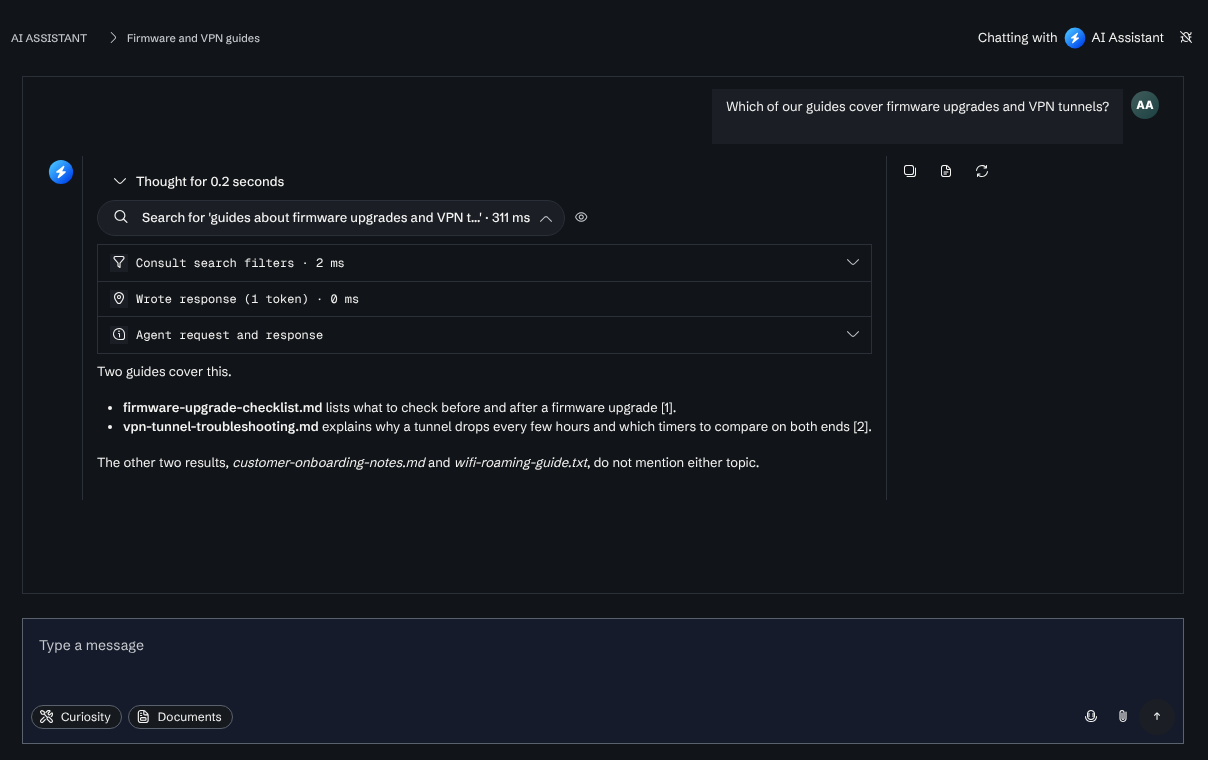
If the interpreter is unavailable or its run fails, the search still happens — on the user's own wording,
with no filters — and the reason comes back as a hint. A failed interpretation is never a failed search.
What the model gets back
{
  "ok": true,
  "interpretation": { "query": "…", "filters": ["file-kind: PDFs"], "explanation": "…" },
  "totalResults": 128,
  "page": 1,
  "pageSize": 10,
  "totalPages": 13,
  "results": [ { "uid": "…", "title": "…", "type": "…", "date": "…", "source": "…", "url": "…" } ],
  "filters": [ { "name": "file-kind", "kind": "value", "appliesTo": ["File"], "values": [ { "value": "PDFs", "count": 42 } ] } ],
  "hint": "…"
}
interpretationis what tells the user how their request was read. Surface it when the results look wrong — that is more useful than paging.filters(page 1 only) is the breakdown of the matches, useful to say how results are distributed or to suggest a narrower search.- Each result
uidis what the reading tools take: an item's content is read withconsult, not guessed from its title.
Pagination is 10 results per page, page is 1-based, and only the first 1000 results (100 pages)
of a search are reachable. Pages 2..N are served from a per-conversation cache of the result UIDs, which
lives for a day: re-running the interpretation would spend another agent run and could return a different
result set under the same page numbers. Asking for a later page without a cached page 1 is refused with a
message saying to read page 1 first.
The model never sees a facet key or a UID
Filters are renamed for the model and values are turned into labels:
| Back-end facet key | What the model sees |
|---|---|
Node.Timestamp |
time — values are date buckets written YYYY-MM-DD..YYYY-MM-DD |
Node.Source |
source |
Type |
node-type — values are data type display names |
_FileEntry.ContentType |
file-kind — MIME types grouped the way the "Kind" facet groups them ("PDFs", "Slides", …) |
_FileEntry.Extension |
file-extension |
Related._Contact |
the node type's display name, Related. dropped — values are node labels, not UIDs |
| anything else | the node type's display name plus the field, kebab-cased |
Values are relabelled to what a user sees in the interface, not to what is stored. A file's content
type reads as its kind — a PowerPoint deck is Slides, not application/vnd.…presentation — and a
file's language reads as the language rather than its code, matching the Kind and Language facets in
the search interface. Counts of every raw value behind a label are summed into one, and filtering on the
label filters on all of them. Two keys that map to the same name are grouped rather than shadowing each
other.
Configuring what is searchable
Settings → Search → LLM Search decides which data types the tool may search and which of the engine's filters the interpreter may apply. Each filter is listed under the name the model will see.
Defaults, applied while nothing is configured:
| Default | |
|---|---|
| Node types | _FileEntry, _WebPage |
| Filters | file-kind, file-extension, source, time |
Keep the list small and meaningful. Every extra filter is more for the model to reason about; a missing one means it has to fall back to words alone.
Access control is not configuration
The node types a user can search are the configured ones intersected with what that user may see —
the empty search behind consult-filters runs as the calling user, so a filter value that only occurs
on items they cannot access never reaches the model. A user with nothing visible gets an explicit
"no data is visible to you" answer instead of an empty search over everything.
The same settings are readable and writable over HTTP for configuration sync:
| Method | Route |
|---|---|
GET |
/api/search/settings/llm |
PUT |
/api/search/settings/llm |
Both require a system administrator; PUT requires write access. Storing an empty set restores the
built-in defaults. The two lists also travel with the workspace definitions export — see
LLM Search: what the assistant may search
for the page itself.
In the tool picker it is one entry, named after the workspace
A user does not pick "search" and "consult" in the chat composer. Reaching into the workspace — finding
things in it, reading what the conversation was handed — is one capability from their side, so the two
tools are offered as a single entry named after the workspace, described as "Search the workspace
and read the items added to this conversation". It starts selected: an assistant that cannot reach the
workspace is the surprising case, not the default. The entry is left out only where neither of the two
tools is available to that assistant and user, and search and consult are not repeated separately in
the list.
To call it something other than the workspace name, set Workspace Tool Name under Settings → Interface → Branding, directly below Workspace Name. Leave it empty to use the workspace name.
What the tool tells the assistant to do
search carries a [ToolSystemPrompt]
excerpt, so every chat that offers it is told — for the whole conversation, not per call — that the model
cannot see the workspace's contents, that it must pass the user's own words instead of pre-encoding
filters, that it should show the interpretation when results look wrong, and that it must cite what it
used. You do not have to repeat any of that in an assistant's prompt.
It also tells the model to search plainly first: no "exact phrase", no AND / OR / NOT, unless
the user's own wording asks for them. Those operators narrow a search that has not yet been shown to
return too much, and picking them is the interpreter's job, not the calling model's.
Related
- Search Configuration — the engine itself: full-text, filters and facets, ranking.
- The consult tool — reading one result in full.
- Deep research — many searches, weighed against each other, in one run.