

Storage and indexing
How Curiosity Workspace persists data on disk, how indexes are laid out alongside it, and what that means for capacity planning, backups, and recovery.
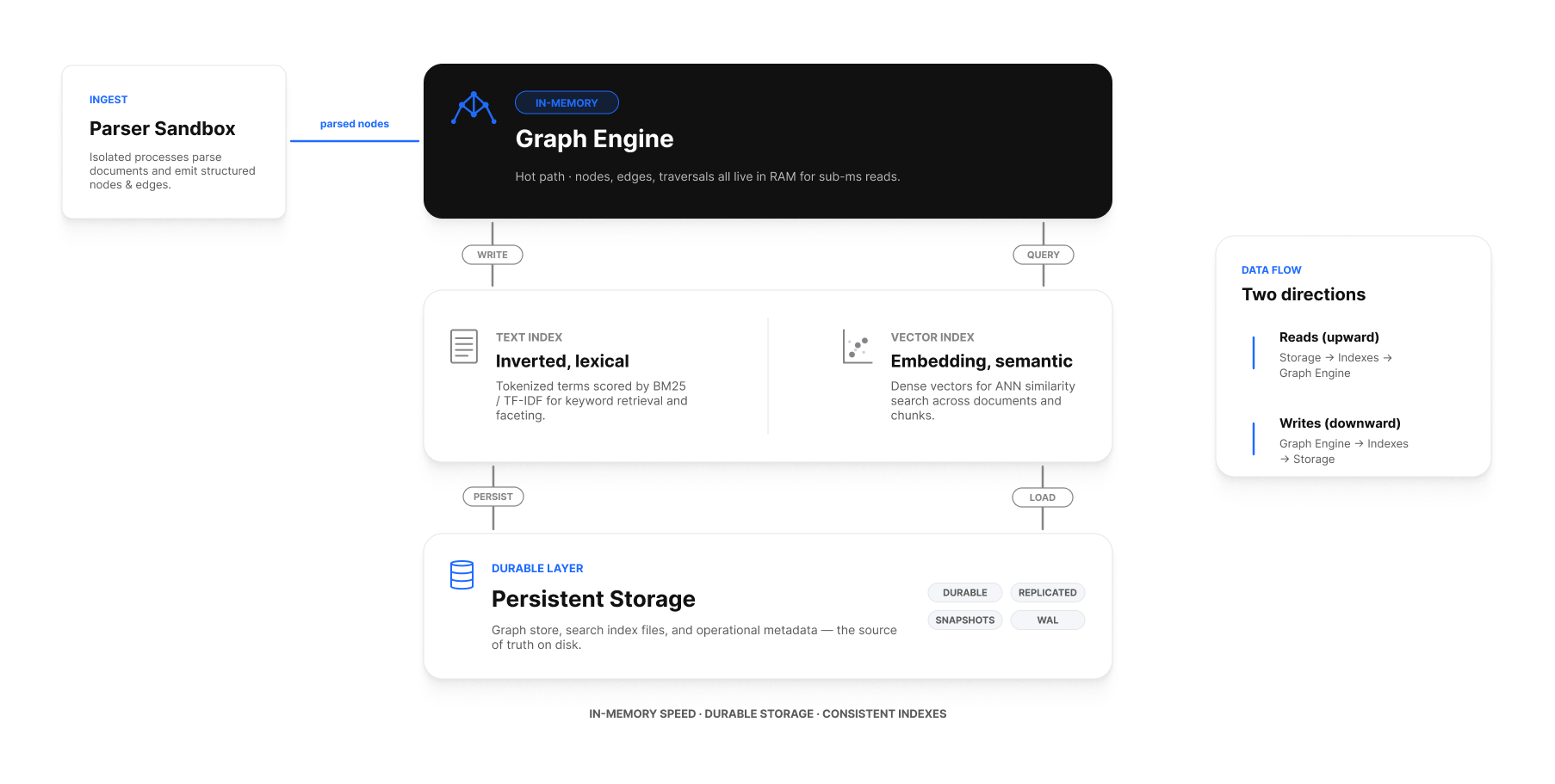
On-disk layout
A running workspace writes to a single root directory pointed at by MSK_GRAPH_STORAGE. Underneath it, the workspace organizes data into several logical areas:
$MSK_GRAPH_STORAGE/
├── graph/                # nodes, edges, properties (the graph database)
├── text-index/           # text search index
├── vector-index/         # vector / embedding index
├── parsers/              # parsed documents (intermediate Document nodes)
├── audit/                # audit log
└── journal/              # write journal (also writable to MSK_GRAPH_JOURNAL_FOLDER)

$MSK_GRAPH_BACKUP_FOLDER/  # rolling backups, if configured
$MSK_LOG_PATH/             # logs, if file-based logging is configured
The directory structure may evolve between releases; treat the whole MSK_GRAPH_STORAGE directory as the unit of backup and restore.
What's in memory vs on disk
| Data | In memory | On disk |
|---|---|---|
| Graph nodes and edges (working set) | Yes (memory-mapped) | Yes (persistent storage) |
| Active text-index segments | Yes (mmap) | Yes |
| Active vector-index segments | Yes (mmap) | Yes |
| Parsed file content | No (streamed from disk on demand) | Yes |
| Backups | No | Yes |
| Journal entries | Buffered | Yes (durable on commit) |
The engine memory-maps graph and index segments and relies on the OS page cache to keep hot data resident. More RAM = larger working set staying in memory = lower query latency. That's the primary scaling lever before you reach for sharding.
Persistence guarantees
- A successful
await graph.CommitPendingAsync()durably writes the change to the journal before returning. A crash immediately after the call cannot lose the change. - Index updates land after the commit returns, but before the workspace acknowledges any search for the changed nodes. There's a brief window where a node is in the graph but not in the search index — application code that needs read-your-writes should query the graph directly, not the index.
- The journal is replayed on every startup. A workspace that boots without errors is consistent.
Sizing
Rough estimates to budget storage at design time:
| Workload | Indicative size |
|---|---|
| Graph (nodes + edges) | ~ 1.5 × the raw property bytes you commit |
| Text index | ~ 1× the sum of indexed text bytes |
| Vector index | ~ (embedded text bytes) × (embedding dims × 4 bytes) ÷ (chunk size) |
| Journal headroom | 5 GB minimum, 20% of graph in steady state |
| Backups (rolling) | 1× the live graph for the most recent snapshot |
A starter PVC of 200 GB is appropriate for hundreds of thousands of documents with embeddings; scale up before you hit 80%.
Storage class recommendations
| Platform | Recommended | Notes |
|---|---|---|
| Linux host with local disk | NVMe SSD | Fastest. |
| Linux host with attached disk | gp3 (AWS), Premium SSD (Azure), pd-ssd (GCP) |
Block storage, low latency. |
| Kubernetes | ReadWriteOnce SSD-class |
Always single-writer. |
| Shared filesystems (NFS / EFS) | Tolerated for non-prod | Slower; the index files are sensitive to latency. |
| Object storage (S3, GCS, Azure Blob) | Not supported as primary | Use only for backups via a sync sidecar. |
Backups
- Snapshot the volume that hosts
MSK_GRAPH_STORAGE. Because reads are lock-free, a snapshot taken while the workspace is running is consistent. - For platforms without native snapshots, set
MSK_GRAPH_BACKUP_FOLDERand schedule a backup task that writes consistent point-in-time copies into it; then ship the folder off-host. - Always back up the secrets (
MSK_JWT_KEY,MSK_GRAPH_MASTER_KEY,MSK_ADMIN_PASSWORD,MSK_LICENSE) separately. A graph backup is useless if you can't decrypt it.
See Backup and restore.
Re-creating indexes
If a text or vector index ever needs rebuilding (because you changed the recipe, switched embedding providers, or restored an older backup onto a newer workspace), the engine does this in the background:
- A new index is built alongside the old one.
- Queries continue against the old index until the new one finishes.
- The engine swaps atomically — no downtime.
See Reindexing and re-embedding for the operational details.
Storage on different platforms
- Docker host: bind-mount a local SSD directory at
/data. See Docker. - Kubernetes:
volumeClaimTemplatesprovisioning aReadWriteOnceblock-storage PVC. See Kubernetes. - AWS: EBS
gp3, snapshot via DLM. See AWS. - Azure: Premium SSD managed disk. See Azure.
- GCP: SSD Persistent Disk. See GCP.
- OpenShift: ODF / Ceph RBD / vSphere CSI / platform default. See OpenShift.
- Windows: NTFS volume on a dedicated SSD. See Windows.
See also
- Configuration reference — every
MSK_GRAPH_*variable. - Backup and restore — what to snapshot and how to restore.
- Reindexing and re-embedding — when and how to rebuild indexes.
- Scaling — capacity planning.