

Text Search
Text search retrieves results by matching tokens — words, numbers, identifiers — between the query and the indexed content. It is the right tool when users know the exact terms they're looking for (titles, IDs, names, distinctive keywords).
For meaning-based retrieval (paraphrases, "find similar"), use Vector Search. For most production deployments, use Hybrid Search which combines both.
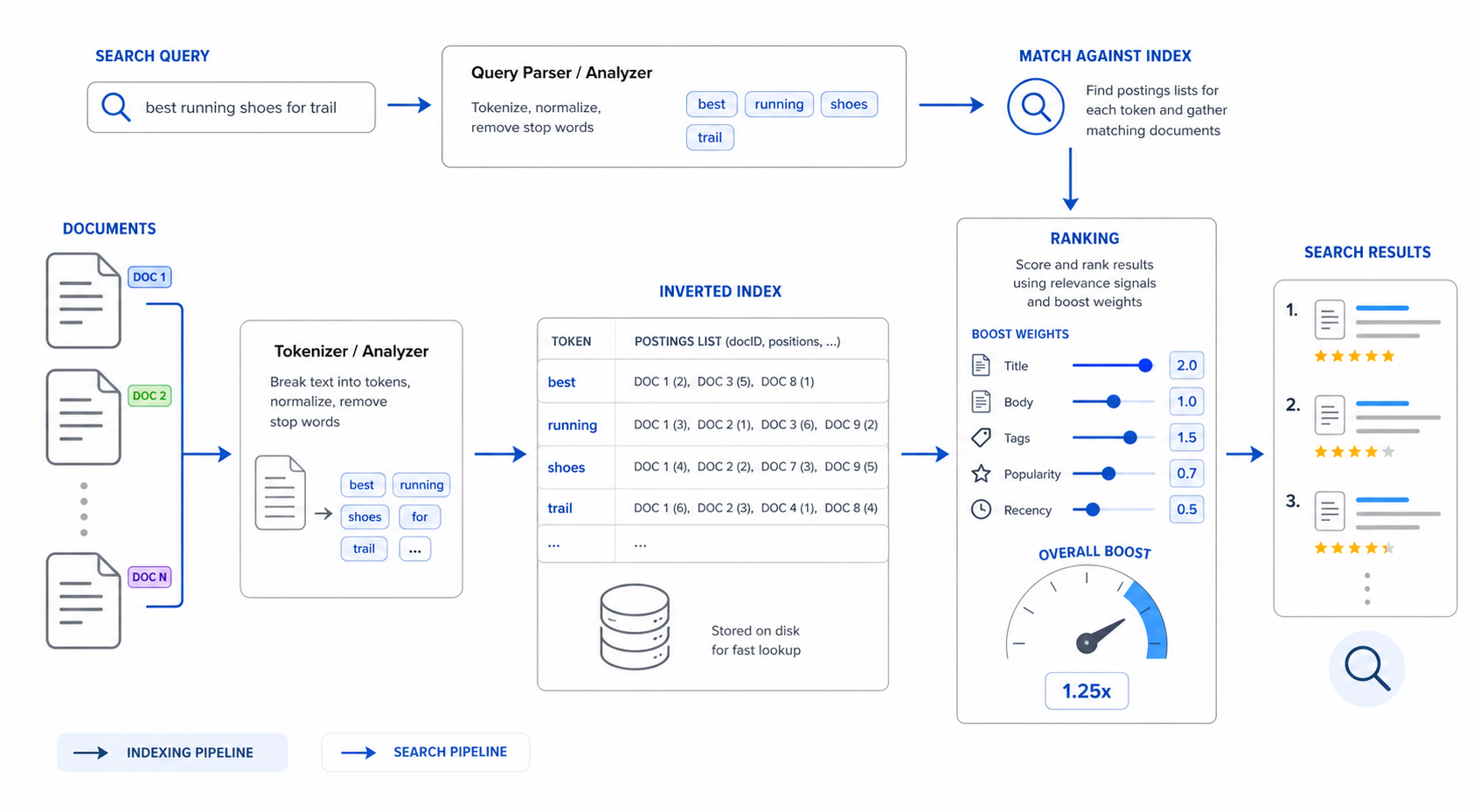
When to use text search
Text search is the strong choice when users:
- search by identifiers (
T-9182, serial numbers, SKUs); - know exact keywords that appear in the data;
- expect predictable matching on short fields (names, titles, statuses);
- need boolean / phrase semantics ("CEO OR Founder",
"exact phrase").
It's the weak choice when users:
- describe a concept in their own words ("the slow customer issue");
- search in a language whose stemming you haven't configured;
- search across very long bodies where keyword overlap is incidental.
What to index
Indexing happens per node type, per field, configured under Settings → Search → Indexes.
Start with the fields users will actually type into the search box:
- Titles / names / subjects — high boost.
- Identifiers — IDs, codes, serial numbers. Often a dedicated exact-match analyzer.
- Short descriptions / summaries — medium boost.
- Long bodies — index if needed, but consider whether vector retrieval would serve users better.
Avoid indexing:
- Boilerplate (legal footers, signatures, generic disclaimers).
- Generated noise (raw stack traces in places where they aren't useful).
- Fields that exist purely for downstream pipelines (raw HTML before parsing, opaque blobs).
Query syntax
The search engine accepts a small, well-defined query language:
| Syntax | Meaning | Example |
|---|---|---|
term1 term2 |
All tokens must match | screen flicker |
"exact phrase" |
Phrase match | "firmware update" |
term1 OR term2 |
Either token | crash OR freeze |
-term |
Exclude | crash -known-issue |
field:value |
Restrict to a field | subject:"firmware" |
field:>=value |
Numeric / date comparison | priority:>=3, createdAt:>=2024-10-01 |
* |
Wildcard suffix | MacBoo* |
Query input is tokenized by the analyzer configured per language (en, de, fr, …). Tokenization decides:
- whether
iPhone-14is one token or two, - whether
runningstems torun, - whether case matters,
- whether accents are stripped.
See Internationalization for the per-language defaults.
Ranking
Text scoring is BM25-style: matches on rare tokens score higher than matches on common tokens, and matches on boosted fields (typically Subject, Title, Name) outweigh matches on body text.
Levers, in order of impact:
- Field boosts — give high-signal fields a weight of 3–10x relative to bodies.
- Filters and facets — narrow the result set before ranking. Cheaper and more accurate than scoring against the whole graph.
- Sort modes — most queries should sort by relevance; for time-sensitive domains, expose a "most recent first" toggle.
- Recency — boost recent content (within the last 30/90 days) when freshness matters for your domain.
See Ranking Tuning for the full workflow.
Filtering and facets
Most production search experiences refine results via facets — that's what turns "many results" into "the right result". Three kinds:
- Property facets — derived from indexed properties:
Status=Open,Priority=P1,Region=EMEA. - Related facets — derived from graph edges:
Customer=Acme,Product=Pro 14,Owner=Engineering. - Time facets — for event-like data: "last 7 days", "this quarter".
Related facets are the differentiator: they let you constrain search by graph relationship without a JOIN. The classic example: search for "screen issue" within tickets owned by customers in the Enterprise tier.
var search = SearchRequest.For("screen issue");
search.BeforeTypesFacet = new([] { "Ticket" });

// Graph-derived target set: tickets for any Enterprise-tier customer
search.TargetUIDs = Q().StartAt("Customer")
                       .Where(c => c.GetString("Tier") == "Enterprise")
                       .Out("HasTicket")
                       .AsUIDEnumerable()
                       .ToArray();

var query = await Graph.CreateSearchAsUserAsync(search, CurrentUser, CancellationToken);
return query.Take(20).Emit("N");
Pagination and result shape
Search requests accept Skip/Take for pagination:
var search = SearchRequest.For(req.Query);
search.Skip = req.Page * 20;
search.Take = 20;
Result objects expose:
UID— stable identifier for the node;Type— node type;- typed property accessors (
n.GetString("Subject"),n.GetDateTimeOffset("CreatedAt")); - score and highlight snippets (when requested).
Permission-aware text search
Always use the user-context variant for user-facing search:
var query = await Graph.CreateSearchAsUserAsync(search, CurrentUser, CancellationToken);
This applies the calling user's ACL filter at query time — see Permission model architecture. The system-context variant Graph.CreateSearchAsync(search) bypasses ACLs and is reserved for admin tasks.
Highlighting
The search engine returns highlight snippets for matched fields when configured. Snippets preserve the matched terms and surrounding context, which the UI renders with marks. Highlights are most useful on title/subject/body fields; turn them off for fields that don't render well as snippets (URLs, raw codes).
Debugging relevance
When a search "isn't finding what it should":
- Sign in as admin and re-run. If results appear, the issue is ReBAC, not search.
- Check the indexed fields under Settings → Search → Indexes. Has the field been added since the last rebuild?
- Check the analyzer. A query that should match an English word might fail under a German analyzer.
- Reduce to a single-term query. Multi-term ranking is harder to reason about.
- Look at the boosted fields. If body text outranks titles, raise the title boost.
- Use facets to bisect. If results appear under a
Type=Ticketfacet but not without it, ranking is being dominated by another type. - Inspect highlights. If a snippet doesn't contain the expected term, the analyzer probably tokenized it differently than you assumed.
Common pitfalls
- Over-indexing: every field costs memory and index time. Start with user-facing fields.
- Under-boosting key fields: long body fields will dominate ranking if titles aren't boosted.
- Mixing types without facets: results that include
Customer,Ticket, andDocumenttogether are usually confusing. Type-scope your queries. - Ignoring the analyzer: enabling English analysis on multilingual content silently misses 30%+ of queries.
- Boolean overuse: most users type 2–3 words. Optimize for that, not for power users with operators.
Next steps
- Add semantic retrieval: Vector Search.
- Combine both: Hybrid Search.
- Tune systematically: Ranking Tuning.
- Make facets actually useful: Search Optimization.
- Reference: Search DSL.