

Search Model
Curiosity Studio search is designed for structured + unstructured data, and integrates tightly with the graph model.
At a high level:
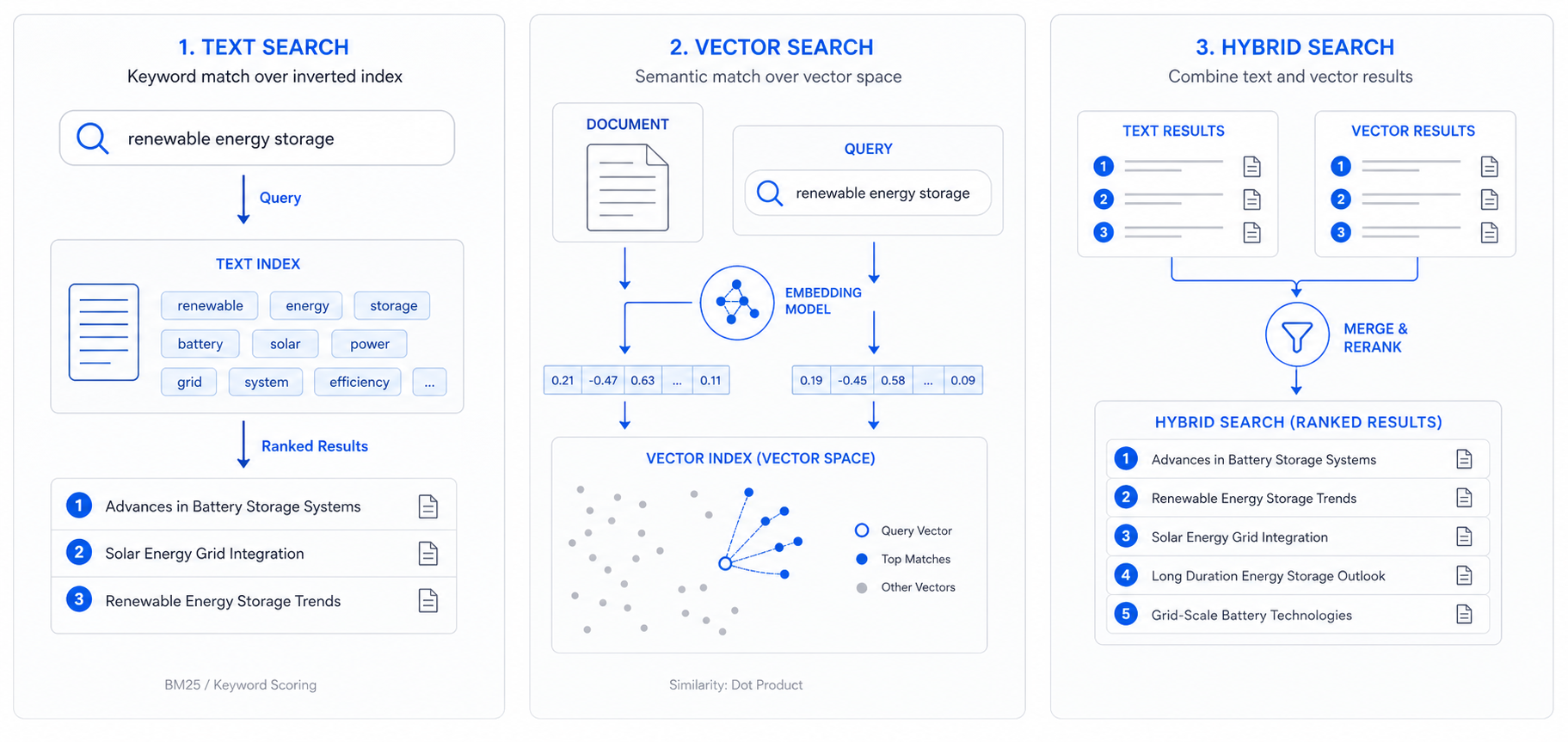
- Text search retrieves results based on keyword matching and ranking.
- Vector search retrieves results based on semantic similarity using embeddings.
- Hybrid search combines both to improve recall and precision.
- Facets / filters constrain results using properties and graph relationships.
What gets indexed
Search indexing is explicit: you choose which node types and which fields are searchable.
Typical choices:
- titles and summaries
- identifiers (ticket IDs, serial numbers)
- descriptions and conversation text
- selected structured fields for faceting
Text search
Text search is strong for:
- exact terms and identifiers
- short fields (names, titles)
- deterministic matching for compliance or audit use cases
Ranking can usually be tuned via:
- field-level boosting (e.g., “title counts more than body”)
- recency or timestamp-aware sort modes
- filtering and scoping (types, sources, permissions)
See Search → Text Search.
Vector search (AI search)
Vector search is strong for:
- semantic similarity (“same issue, different words”)
- long text fields where users don’t know the right keywords
- multilingual or paraphrased content (depending on embedding model choice)
Key concepts:
- Embedding model turns text into vectors.
- Vector index stores vectors for fast similarity retrieval.
- Chunking may be required for long text fields to avoid losing context.
Filters and facets (including graph facets)
Search is frequently scoped by:
- property facets (e.g.,
Status=Open,Priority=P1) - related facets (e.g.,
Ticketrelated toCustomer=Acmevia graph edges) - time filters (useful for event-like nodes)
Graph-integrated faceting is often the differentiator: it lets you constrain search based on relationships rather than only local fields.
Access control (conceptual)
In production environments, search must respect:
- user permissions
- document/node visibility
- tenant isolation (if multi-tenant)
See Administration → Permissions.
Next steps
- How to configure text retrieval: Search → Text Search
- How to add embeddings: NLP → Embeddings