

Permission model architecture
This is the architecture view of how ReBAC permissions are ingested, stored, and enforced in Curiosity Workspace. For the user-facing controls, see Access control model. For the conceptual overview, see Permissions.
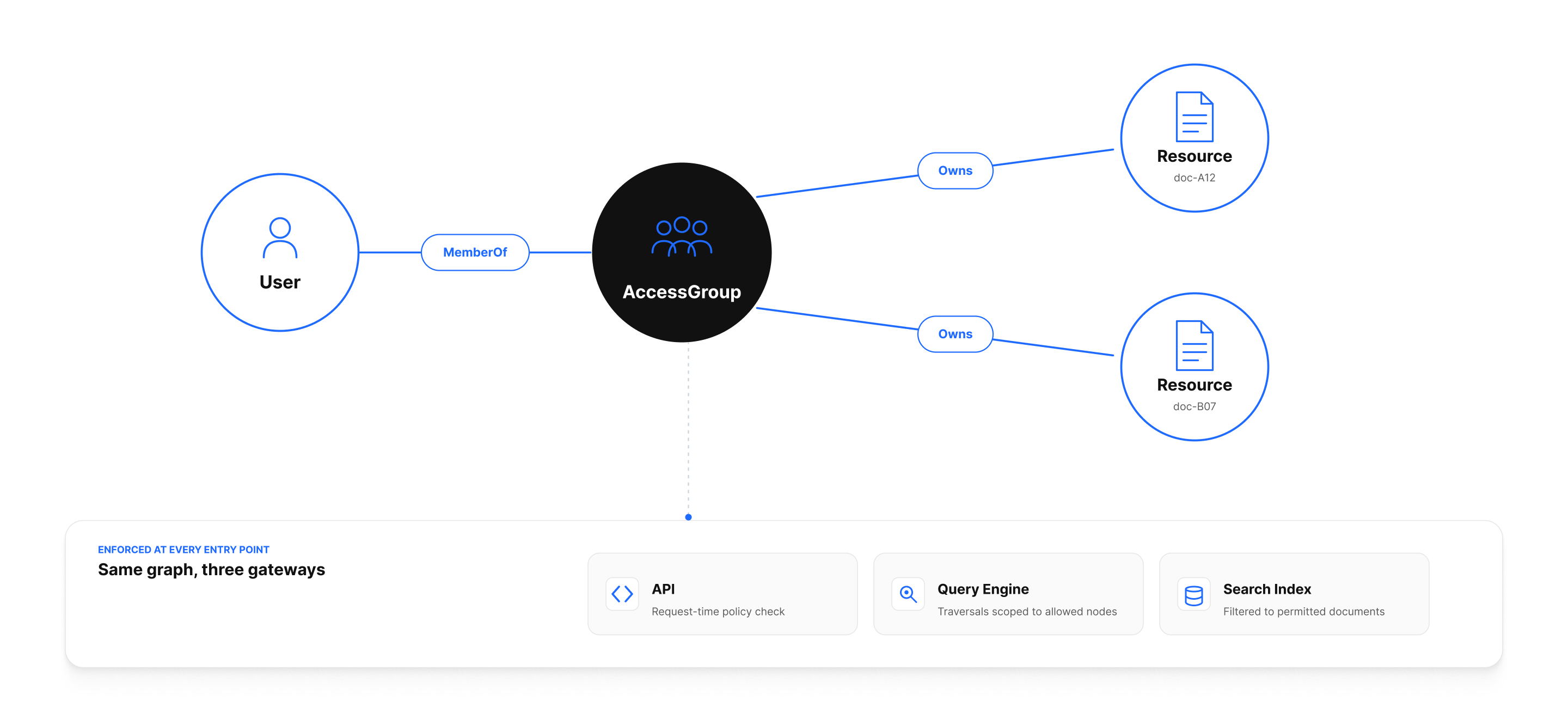
End-to-end flow
What's modeled in the graph
| Node / edge | Purpose |
|---|---|
_User |
One per user (local or SSO). Created on first sign-in. |
_AccessGroup |
A team. Displayed as Team in the UI. |
_MemberOf / _HasMember |
Bidirectional edges between users and teams. |
_Owns / _OwnedBy |
Bidirectional ownership edges between an owner (user or team) and a resource. |
PUBL1CaccesSgr8up11111 |
The public access group. Anything _OwnedBy it is visible to all authenticated users. |
PRivAtEAcceSSGroUP1111 |
The private access group. Marker the workspace uses internally to flag content as restricted. |
The bidirectional naming is intentional: graph traversals are cheap in either direction, and the engine maintains both edges when you call helpers like RestrictAccessToTeam.
How ACLs are ingested
A connector attaches access control while it's writing data:
var team = await graph.CreateTeamAsync("Enterprise Support", "Enterprise customers");

foreach (var row in source)
{
    var node = graph.TryAdd(new Ticket { Id = row.Id, ... });

    if (row.Confidentiality == "Enterprise")
        graph.RestrictAccessToTeam(node, team);
    else if (row.Confidentiality == "Public")
        ; // default — no restriction means public
}

await graph.CommitPendingAsync();
The helper methods (RestrictAccessToTeam, RestrictAccessToUser, MarkFileAsPrivate) maintain _Owns / _OwnedBy pairs and update the affected node's ACL filter in the search index.
How permissions are evaluated
There are three enforcement points, all backed by the same source of truth:
1. The graph engine
A user fetching a node by UID or traversing into a neighbor is implicitly filtered: the engine asks is there a path from this user (via membership / ownership) to this resource? If not, the node is excluded from the result set. There is no need for application code to check permissions before showing a node.
2. The search engine
ACLs are denormalized into the search index at write time. For each indexed document, the engine stores the set of _AccessGroup UIDs (plus the user UID, if owned directly) that can see it.
At query time, the engine augments every query with a filter:
(access_groups:PUBL1CaccesSgr8up11111 OR
 access_groups:<this user's UID> OR
 access_groups:<each team the user belongs to>)
This is what makes permission-aware retrieval fast — there's no post-filter to run after ranking.
3. Custom endpoints
Endpoints that retrieve data on a user's behalf must use the user-context variants:
var query = await Graph.CreateSearchAsUserAsync(req, CurrentUser, CancellationToken);
Graph.CreateSearchAsync(...) (without the AsUser suffix) runs in the system context and ignores ACLs. It exists for admin or system tasks that legitimately need to see everything (audit, backfill, sync). Use the system variant only when you're certain.
Sign-in and team mapping
On every sign-in:
- The IdP returns the user's identity and group memberships in the token.
- The workspace creates or updates the
_Usernode. - The workspace looks up the configured SSO group mapping under Settings → SSO → Group Mapping.
- For each mapped group, the workspace ensures the user has a
_MemberOfedge to the matching_AccessGroup.
Group memberships are refreshed on each sign-in, so a removal in the IdP propagates on next login. If you need immediate revocation, also remove the user via Settings → Accounts → Users.
Anti-patterns
- Restricting to many individual users instead of a team. A graph with 10 000 edges from a document to individual users is functional but harder to manage. Use teams.
- Granting "Public" to everything. Defeats ReBAC and gives external tools (especially AI tools) more reach than intended.
- Bypassing
CreateSearchAsUserAsyncin user-facing endpoints. It's a one-line change with major security implications. - Modeling permissions outside the graph. Storing access lists in a separate table breaks the unified-permission story; the search engine won't see your custom rules.
Operational implications
- Schema migrations that rename the bookkeeping properties on
_AccessGrouprequire a reindex so the index ACL filter stays accurate. See Reindexing and re-embedding. - Mass ACL changes (moving a team's content to a new team) should be done via a scheduled task that walks the graph, calls
RestrictAccessTo*, and commits in batches. Don't do this on a hot ingestion path. - Audit log captures team membership changes and ACL changes — forward it to your SIEM.
See also
- Access Control Model (deep dive) — the user-facing reference.
- Permissions — operational guidance.
- SSO — group-claim mapping.
- Security — surrounding controls.