

RAG and agent architecture
How Curiosity Workspace structures Retrieval-Augmented Generation, AI tools, and agent-style workflows so they're grounded, permission-aware, citable, and auditable.
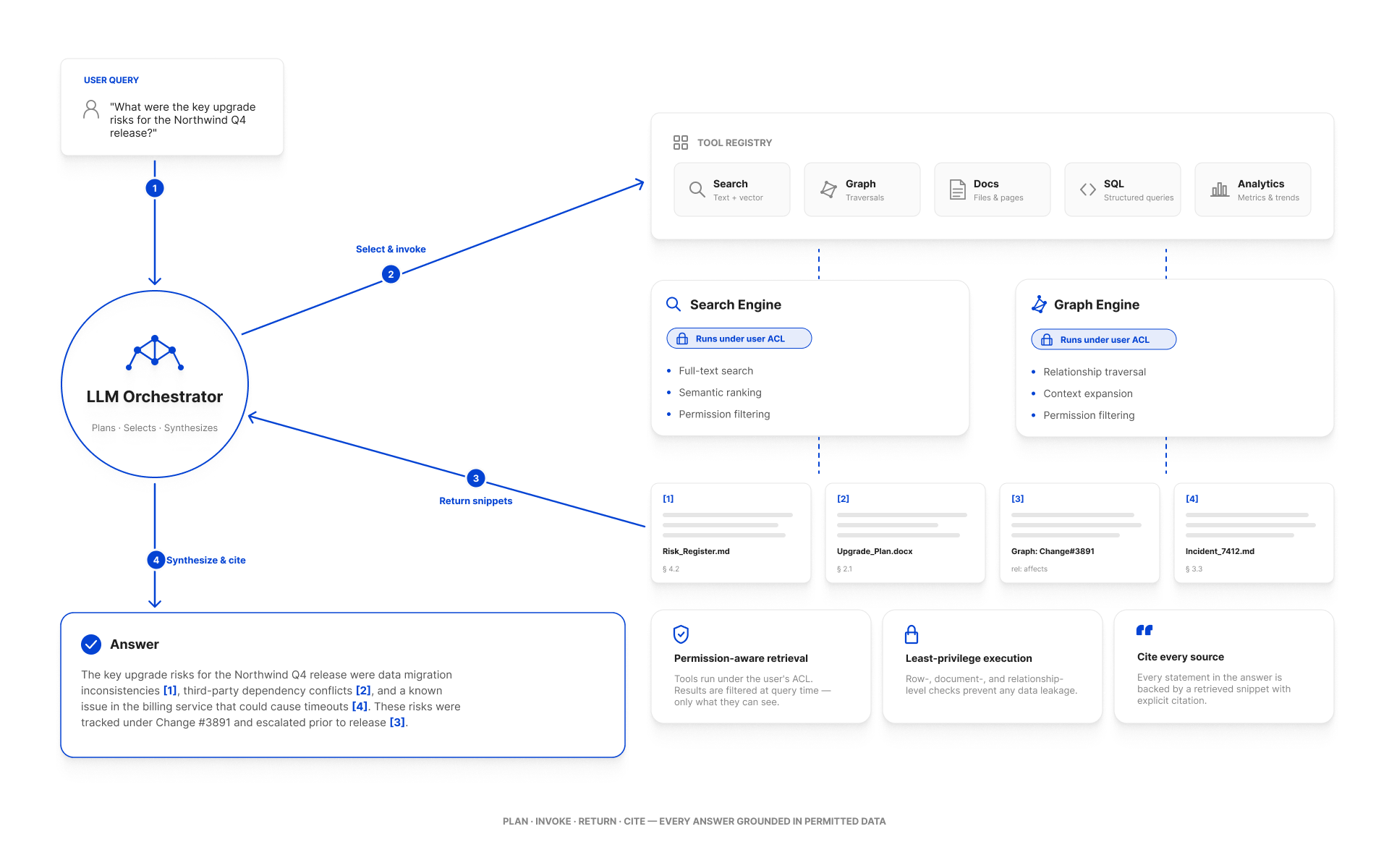
The shape we recommend
Three things happen on every turn:
- The orchestrator gives the LLM only the tools the user is allowed to call, no raw graph/search access.
- Tools that retrieve data do it through the user's security context, so the LLM never sees content the user can't see.
- Every retrieved chunk is registered as a snippet, and the LLM is instructed to cite it with a bracketed ID —
[1],[2]— that becomes a clickable link in the UI.
The hard constraint: the LLM never decides what the user is allowed to read. The graph and search engines decide; the LLM gets a filtered view.
Building blocks
Custom endpoints
Server-side C# that wraps a specific retrieval or action. Endpoints are the building block for everything else — both AI tools and external integrations typically call into endpoint code (or share helpers with it). See Custom Endpoints.
AI tools
Annotated C# classes the LLM can invoke. Each method decorated with [Tool] becomes a callable action; each [Parameter] becomes a typed argument the LLM fills in.
public class TicketTools
{
    [Tool("Search the support-ticket knowledge base for tickets similar to the user's question.")]
    public static async Task<string> FindSimilarTickets(ToolScope scope,
        [Parameter("The symptom or question", required: true)] string query,
        [Parameter("Optional product SKU to scope the search", required: false)] string productSku)
    {
        // permission-aware retrieval
        var search = SearchRequest.For(query);
        search.BeforeTypesFacet = new([] { "Ticket" });
        var q = await scope.Graph.CreateSearchAsUserAsync(search, scope.CurrentUser, scope.CancellationToken);

        var results = q.Take(10).AsEnumerable().Select(n => {
            var text = scope.ChatAI.GetTextFromNode(n.UID, limit: 4_000);
            var id   = scope.AddSnippet(uid: n.UID, text: text);
            return new { snippetId = id, subject = n.GetString("Subject"), body = text };
        }).ToArray();

        scope.SetToolCallDisplayName($"Looked for tickets like '{query}'");
        return results.ToJson();
    }
}
return new TicketTools();
The ToolScope parameter is the workspace's contract with the tool:
scope.Graph— graph access.scope.CurrentUser— the user the chat is running as.scope.ChatAI.GetTextFromNode(uid, limit)— fetch indexed text for grounding.scope.AddSnippet(uid, text)— register a citation; the integer returned becomes the bracket reference.scope.SetToolCallDisplayName(...)— a human-readable label shown in the trace.scope.CancellationToken— propagate the user's cancel.
See AI Tools.
The chat orchestrator
The orchestrator is the workspace's own runtime. It:
- Knows which tools are visible to the user (admin tools only show up for admins).
- Streams the LLM's response back to the chat UI.
- Stops a tool call that exceeds its time/budget.
- Logs the whole turn (prompt, tool calls, results, answer, citations) into the audit log.
You don't write the orchestrator; you parameterize it via LLM Configuration and Prompting Patterns.
Common patterns
Grounded Q&A (the default RAG shape)
- LLM receives the user's question + a small set of retrieval tools.
- LLM calls
FindSimilar*/SearchDocstools. - Tools return content + snippet IDs.
- LLM synthesizes an answer with
[1][2]references. - UI hydrates each reference into a clickable source card.
Tool-using agent (multi-step work)
- LLM is given retrieval and action tools (e.g.,
UpdateTicketStatus,AssignToTeam). - LLM calls retrieval tools, then action tools.
- Action tools must be idempotent, bounded, and permission-aware.
- The audit log captures every tool invocation for post-hoc review.
Permission-aware retrieval with graph scope
This is the pattern that gives Workspace its edge over raw vector search: bind the LLM's "where to look" to the graph.
// "Find tickets like this question, but only for tickets the user owns
//  on the product they're currently looking at"
search.TargetUIDs = scope.Graph.Q()
    .StartAt("Product", productSku)
    .In("ForProduct")
    .AsUIDEnumerable()
    .ToArray();
The vector search and BM25 both operate within that target set. Permissions are still applied on top.
Safety properties
| Property | How it's enforced |
|---|---|
| The LLM never sees content the user can't see. | CreateSearchAsUserAsync(..., scope.CurrentUser, ...). |
| The LLM can only call tools that have been exposed. | Tool registry is server-controlled; the prompt only contains tool definitions for the calling user. |
| Tool calls are auditable. | Every invocation is logged with caller, args, result size, and trace ID. |
| Hallucinations are reduced. | Tools register snippet IDs; the prompt instructs the LLM to cite only registered IDs. |
| Long-running tool calls are bounded. | scope.CancellationToken carries the user's cancel; the orchestrator enforces a per-call timeout. |
Anti-patterns
- Calling
Graph.CreateSearchAsync(...)(withoutAsUser) from a tool. The system context bypasses ACLs. - Embedding business rules in the prompt. Put them in tool code where they can be tested and audited.
- Passing whole documents to the LLM. Use snippets and short summaries; vector retrieval already selected the relevant parts.
- Exposing destructive actions as tools without confirmation. Mark them with conservative descriptions and prefer staged actions (propose → user confirms → execute).
Operational considerations
- Cost: every chat turn calls the LLM at least once, plus an embedding call per tool retrieval. Budget accordingly; see Performance Tuning.
- Latency: tool calls add round trips. Aim for ≤ 3 tools per turn for interactive chat; more is fine for back-of-house workflows.
- Provider failure: configure a fallback provider, and let tools degrade gracefully when no LLM is available.
- Per-tool metrics:
GET /api/chatai/tools/metricsexposes counts, latencies, and error rates. See Monitoring.
See also
- AI Tools — the tool definition reference.
- Custom Endpoints — server-side building blocks.
- Prompting Patterns — prompt templates.
- LLM Configuration — provider setup.
- Permission model architecture — the ReBAC plumbing tools rely on.