

RAG and agent architecture
How Curiosity Studio structures Retrieval-Augmented Generation, AI tools, and agent-style workflows so they're grounded, permission-aware, citable, and auditable.
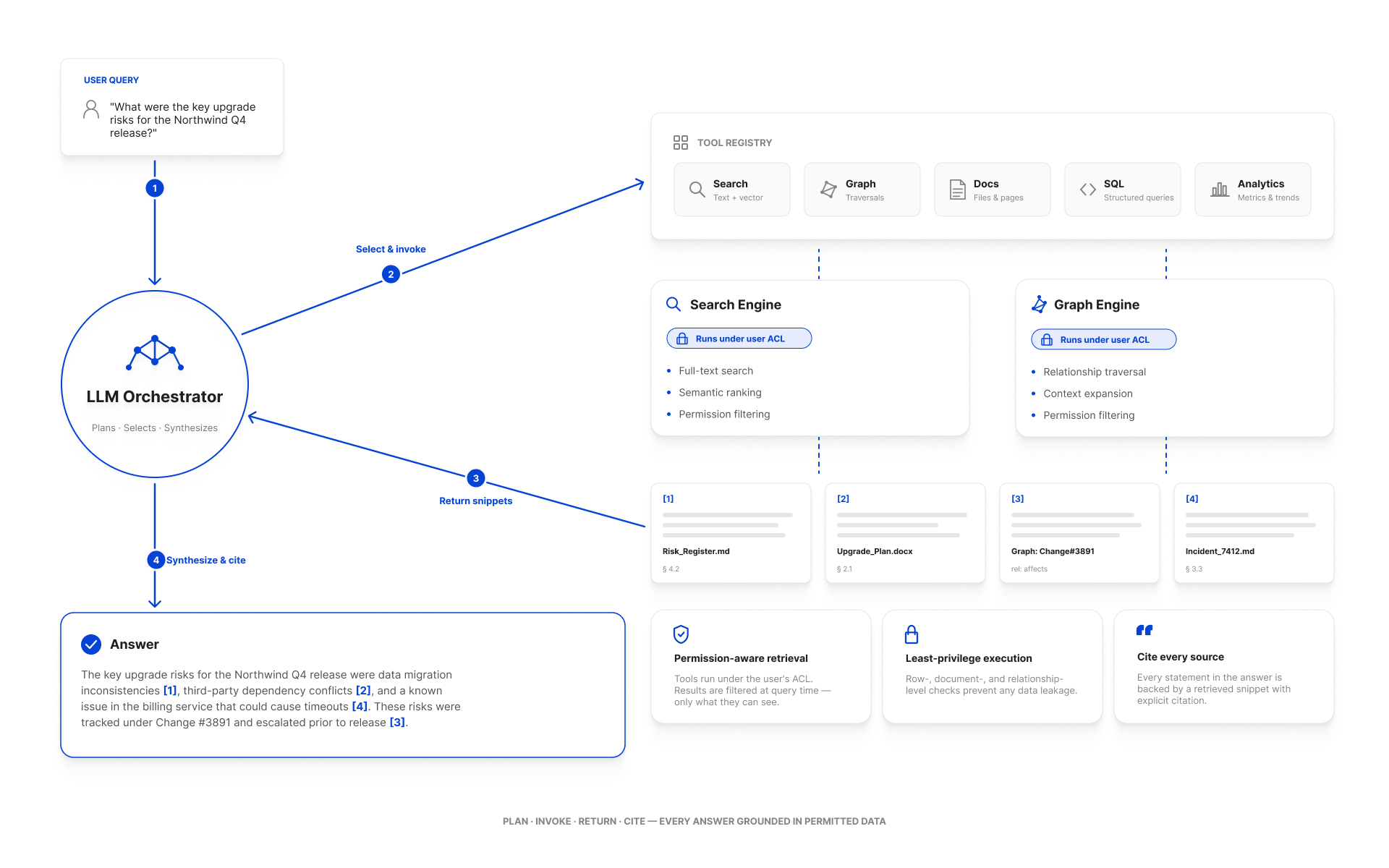
The shape we recommend
Three things happen on every turn:
- The orchestrator gives the LLM only the tools the user is allowed to call, no raw graph/search access.
- Tools that retrieve data do it through the user's security context, so the LLM never sees content the user can't see.
- Every retrieved chunk is registered as a snippet, and the LLM is instructed to cite it with a bracketed ID —
[1],[2]— that becomes a clickable link in the UI.
The hard constraint: the LLM never decides what the user is allowed to read. The graph and search engines decide; the LLM gets a filtered view.
Building blocks
Custom endpoints
Server-side C# that wraps a specific retrieval or action. Endpoints are the building block for everything else — both AI tools and external integrations typically call into endpoint code (or share helpers with it). See Custom Endpoints.
AI tools
Annotated C# classes the LLM can invoke. Each method decorated with [Tool] becomes a callable action; each [Parameter] becomes a typed argument the LLM fills in.
public class TicketTools
{
    [Tool("Search the support-ticket knowledge base for tickets similar to the user's question.")]
    public static async Task<string> FindSimilarTickets(ToolScope scope,
        [Parameter("The symptom or question", required: true)] string query,
        [Parameter("Optional product SKU to scope the search", required: false)] string productSku)
    {
        // permission-aware retrieval
        var search = SearchRequest.For(query);
        search.BeforeTypesFacet = new([] { N.Ticket.Type });
        var q = await scope.Graph.CreateSearchAsUserAsync(search, scope.CurrentUser, scope.CancellationToken);

        var results = q.Take(10).AsEnumerable().Select(n => {
            var text = scope.ChatAI.GetTextFromNode(n.UID, limit: 4_000);
            var id   = scope.AddSnippet(uid: n.UID, text: text);
            return new { snippetId = id, subject = n.GetString("Subject"), body = text };
        }).ToArray();

        scope.SetToolCallDisplayName($"Looked for tickets like '{query}'");
        return results.ToJson();
    }
}
return new TicketTools();
The ToolScope parameter is the workspace's contract with the tool:
scope.Graph— graph access.scope.CurrentUser— the user the chat is running as.scope.ChatAI.GetTextFromNode(uid, limit)— fetch indexed text for grounding.scope.AddSnippet(uid, text)— register a citation; the integer returned becomes the bracket reference.scope.SetToolCallDisplayName(...)— a human-readable label shown in the trace.scope.CancellationToken— propagate the user's cancel.
See AI Tools.
The chat orchestrator
The orchestrator is the workspace's own runtime. It:
- Knows which tools are visible to the user (admin tools only show up for admins).
- Streams the LLM's response back to the chat UI.
- Stops a tool call that exceeds its time/budget.
- Writes each completed turn to the audit log as one ChatAI entry: the conversation sent to the model and the reply, with its tool calls and their results. This happens while the ChatAI type is selected in the audit settings.
You don't write the orchestrator; you parameterize it via LLM Configuration and Prompting Patterns.
Common patterns
Grounded Q&A (the default RAG shape)
- LLM receives the user's question + a small set of retrieval tools.
- LLM calls
FindSimilar*/SearchDocstools. - Tools return content + snippet IDs.
- LLM synthesizes an answer with
[1][2]references. - UI hydrates each reference into a clickable source card.
Tool-using agent (multi-step work)
- LLM is given retrieval and action tools (e.g.,
UpdateTicketStatus,AssignToTeam). - LLM calls retrieval tools, then action tools.
- Action tools must be idempotent, bounded, and permission-aware.
- With the ChatAI audit type selected, each turn's tool calls and results are in the audit log for post-hoc review.
Iterative research (many turns behind one tool call)
Some questions cannot be answered from one retrieval: they need several searches, read against each other, with what the earlier ones turned up deciding what the later ones look for. That shape is a deep researcher — a tool that plans the question into steps, gathers evidence per direction with the tools it was given, and answers with a written, sourced report. The assistant makes one tool call; the loop, its budget and the shared queue it is admitted by belong to the workspace. See Deep research.
Permission-aware retrieval with graph scope
This is the pattern that gives Workspace its edge over raw vector search: bind the LLM's "where to look" to the graph.
// "Find tickets like this question, but only for tickets the user owns
//  on the product they're currently looking at"
search.TargetUIDs = scope.Graph.Q()
    .StartAt(N.Product.Type, productSku)
    .Out(edgeType: "ForProduct")
    .AsUIDEnumerable()
    .ToArray();
The vector search and BM25 both operate within that target set. Permissions are still applied on top.
Safety properties
| Property | How it's enforced |
|---|---|
| The LLM never sees content the user can't see. | CreateSearchAsUserAsync(..., scope.CurrentUser, ...). |
| The LLM can only call tools that have been exposed. | Tool registry is server-controlled; the prompt only contains tool definitions for the calling user. |
| Tool calls are auditable. | With the ChatAI audit type selected, each completed turn is logged with the user, the messages, and every tool call with its arguments and result. |
| Hallucinations are reduced. | Tools register snippet IDs; the prompt instructs the LLM to cite only registered IDs. |
| Long-running tool calls are bounded. | scope.CancellationToken carries the user's cancel; the orchestrator enforces a per-call timeout. |
Anti-patterns
- Calling
Graph.CreateSearchAsync(...)(withoutAsUser) from a tool. The system context bypasses ACLs. - Embedding business rules in the prompt. Put them in tool code where they can be tested and audited.
- Passing whole documents to the LLM. Use snippets and short summaries; vector retrieval already selected the relevant parts.
- Exposing destructive actions as tools without confirmation. Mark them with conservative descriptions and prefer staged actions (propose → user confirms → execute).
Operational considerations
- Cost: every chat turn calls the LLM at least once, plus an embedding call per tool retrieval. Budget accordingly; see Performance Tuning.
- Latency: tool calls add round trips. Aim for ≤ 3 tools per turn for interactive chat; more is fine for back-of-house workflows.
- Provider failure: configure a fallback provider, and let tools degrade gracefully when no LLM is available.
- Per-tool metrics:
GET /api/chatai/tools/metricsexposes counts, latencies, and error rates. See Monitoring.
See also
- AI Tools — the tool definition reference.
- Built-in AI Tools —
search,consultand deep research, as shipped. - Custom Endpoints — server-side building blocks.
- Prompting Patterns — prompt templates.
- LLM Configuration — provider setup.
- Permission model architecture — the ReBAC plumbing tools rely on.