

Configuration Sync to Git
The Workspace can mirror its administrative configuration — schemas, roles, permissions, connectors, scheduled tasks and other definitions — into a Git repository. Every change made by an admin is committed automatically, with the author and an optional message attached. When a remote is configured, the same commits are pushed upstream so the repository becomes the audit trail and the disaster-recovery copy of the workspace configuration.
Use it to:
- Track who changed which configuration setting, and when.
- Promote configuration from staging to production by pulling the same commits into another workspace.
- Recover a known-good configuration after a misconfiguration or a restore.
Scope
Only administrative configuration (the "definitions" exported by the workspace) is tracked. Graph content, ingested documents, embeddings and search indexes are not stored in this repository — those belong to backups. See Backup and restore.
How it works
On startup, when MSK_GIT_TRACK_STATE_PATH is set, the workspace opens (or
initializes) a Git repository at that path and checks out the configured
branch. From then on, every tracked administrative change triggers an export
of the current configuration into the repository's definitions/ folder,
followed by a commit with the author set to the user who made the change.
If MSK_GIT_REMOTE_URL is also set, the workspace pushes the branch upstream
after each commit using the supplied credentials.
The export is incremental. Only the definition files whose source actually
changed are regenerated and rewritten, rather than re-formatting every endpoint,
AI tool, task and index and rewriting the whole definitions/ tree on each
tracked change. Unchanged files keep their bytes, so git's stat cache survives
and repeated configuration edits sync noticeably faster on a large workspace. A
file the export no longer produces is deleted from the tree. The first sync after
a restart regenerates the tree once, and the byte comparison keeps that off git.
Required environment variables
| Variable | Required | Default | Description |
|---|---|---|---|
MSK_GIT_TRACK_STATE_PATH |
yes | — | Absolute path to the local directory used as the Git working tree. Created and git init-ed on first start if it doesn't already contain a .git folder. |
MSK_GIT_TRACK_STATE_BRANCH |
no | main |
Branch that receives the configuration commits. |
MSK_GIT_REMOTE_URL |
no | — | HTTPS URL of the remote repository to push commits to. When unset, history stays local. |
MSK_GIT_REMOTE_USERNAME |
conditional | — | Username for the remote. Required when MSK_GIT_REMOTE_URL is set and the remote requires authentication. |
MSK_GIT_REMOTE_PASSWORD |
conditional | — | Password or personal access token for the remote. Required alongside MSK_GIT_REMOTE_USERNAME. |
Persist the repository path
MSK_GIT_TRACK_STATE_PATH must point to a location that survives container
restarts. In Docker or Kubernetes, mount a volume at that path — otherwise the
repository is recreated on every start and the history is lost.
Credentials
Use a service account or a personal access token scoped to the single configuration repository — not a long-lived user credential.
- GitHub: a fine-grained PAT with
Contents: read & writeon the target repository works as the password. SetMSK_GIT_REMOTE_USERNAMEto any non-empty string (GitHub ignores it for PAT auth). - GitLab: a project access token with the
Developerrole and thewrite_repositoryscope. - Azure DevOps: a PAT with
Code: Read & Write. Use the PAT as the password.
What ends up in the repository
The first commit on a fresh repository contains only a README.md placeholder.
Subsequent commits add and update files under definitions/. The full layout
is regenerated from the live workspace on every change, so the working tree
always reflects the workspace's current configuration — there are no partial
edits.
The tree mirrors the definitions export:
| Folder | Contents |
|---|---|
definitions/code/ |
Endpoints, AI tools, AI agents, AI assistants, skills, AI prompt templates, AI providers, entity post-processing, scheduled / data-connector / migration tasks, tests, and custom code and search indexes. |
definitions/config/ |
Node schemas (as C# classes, under config/schemas/nodes/), the edge-schema list, node styles and renderers, other index settings, chat policies, chat-policy enforcement settings, secret declarations, access-group declarations, installed packages, and the search, interface, file-indexing and general settings files. |
definitions/nlp/ |
Spotters, pattern spotters, pipelines, and entity-linking configuration. |
A few of those carry rules worth knowing before you read a diff:
- Chat policies get one file per policy under
config/chat-policies, written as the same definition the admin interface edits, with enum values written as names so a diff stays readable. The built-in policies are seeded from code on every boot and stay out of the repository. - Chat-policy enforcement settings — everything governing the batched sweep —
live in
config/chat-policy-enforcement.json. - Deep research maximum limits (concurrent runs, queued runs, concurrent runs
per user, iterations, duration) ride along in
config/general.json. - Secrets export their declaration only: name and description, under
config/secrets. The value is written as the literalNOT EXPORTED, so a reader of the file or of the diff can see it was withheld rather than missed. Declarations travel because code that reads a secret only compiles where the declaration exists. - Custom AI assistants carry their chat prompt, the tools, agents and skills they pin, and whether they are shared. The built-in admin assistant is seeded from code and stays out.
- The built-in consult tool is exported once a workspace has edited it; a workspace still running the shipped code re-seeds it on boot instead.
- A node schema is a C# class, one file per node type under
config/schemas/nodes/<Type>.cs. The class is the node type and its properties are its fields, spelled the way the graph generates them (List<T>,Dictionary<string, T>,List<List<T>>);[schema: Curiosity.Schemas.Key("…")]names the key field. A node type the workspace owns rather than an admin declares carries[schema: Curiosity.Schemas.InternalNodeType], declares no schema, and lists only the fields that are restricted. - Access control sits on the thing it restricts.
[schema: Curiosity.Schemas.AccessGroup("<group uid>")]on the class restricts the whole node type; the same attribute on a property restricts that one field. The group's name is written beside it as a comment, which the reader skips, so a diff is readable. The oldNodeTypeAccessControlandFieldAccessControlentries inconfig/general.jsonare read-only legacy — a bundle taken before the move still imports, but nothing writes them any more. - Access groups travel as declarations, one
config/access-groups/<name>.<uid>.jsonper group, carrying its UID, name, description, hidden flag and scope — and never its membership, which belongs to the workspace it is imported into. Only groups in the shared, name-derived namespace are exported: the built-in public and private groups, and the groups derived from a user, a company or a node (a user's memories or archives, an SSO company, the group behind a shared node) are not workspace configuration and stay out.
Each commit message follows the pattern:
Configuration Sync (<optional context provided by the change>)
The author is the user who triggered the change (full name and email taken
from their workspace profile). The committer is always the
Curiosity Studio service identity.
Do not commit manually
The repository is regenerated by the workspace on every tracked change. Manual commits or edits to the working tree will be overwritten the next time an admin changes configuration. Treat the repository as read-only on the remote side and use it for review and audit only.
Importing the definitions into another workspace
Promoting a configuration means feeding the same definitions/ tree into the
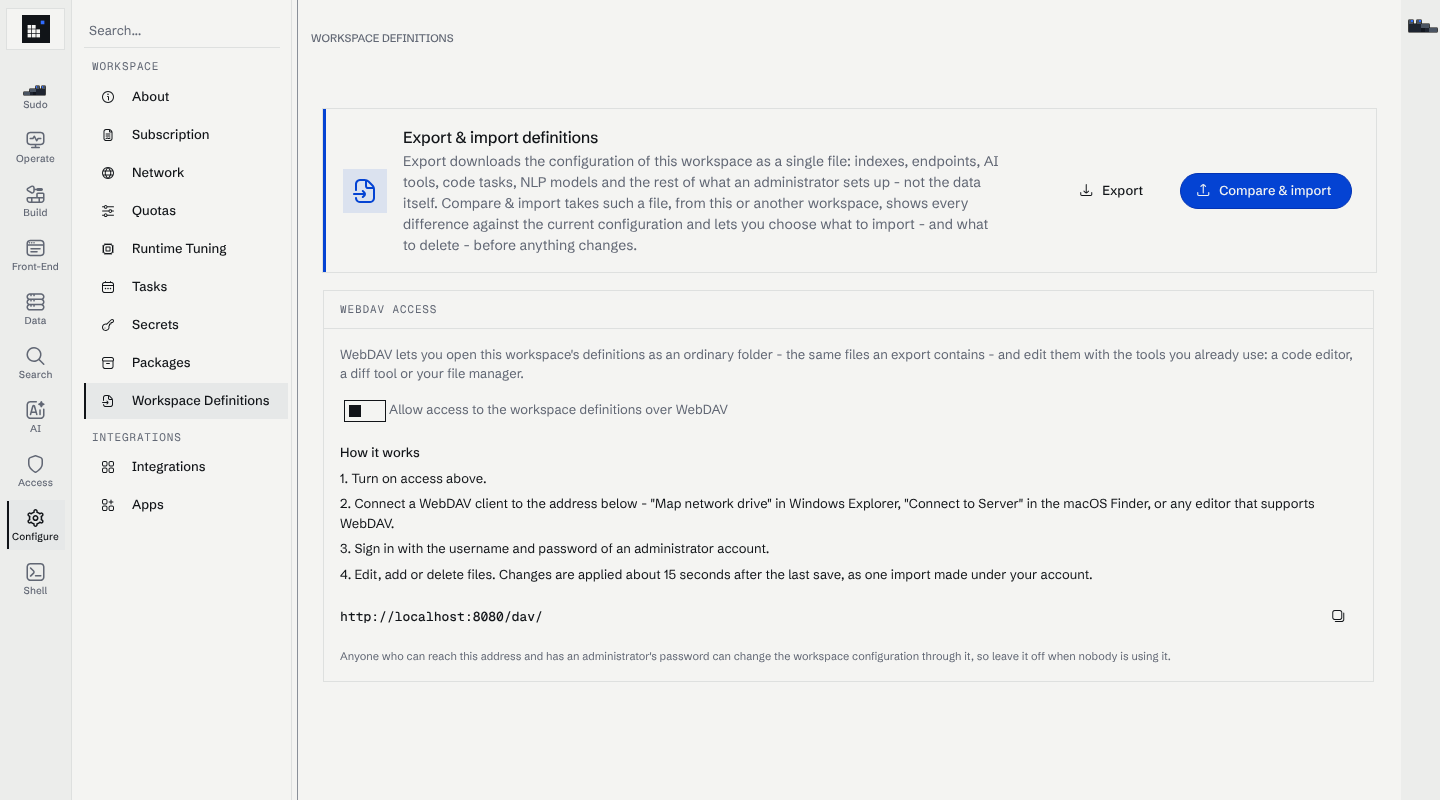
target workspace as a definitions bundle. Manage → Configure → Workspace Definitions has the
Export and Compare & import buttons for it, and the WebDAV switch below them.
What the import does with it:
- Overwriting an existing definition is recorded. An import that replaces an endpoint, AI tool, prompt template, entity post-processing, code / data-connector / migration task, AI provider, agent or skill leaves the same change-history entry a hand edit does, attributed to whoever ran the import, so the change can be reviewed, diffed and rolled back from the History view. Creating a definition the workspace did not have is deliberately not recorded — there is nothing to diff against.
- A live secret is never overwritten. A secret the target already has is left completely untouched, values included. A secret it lacks is created with an empty value and named in the import warnings; set its value under Manage → Configure → Secrets before the code that reads it runs.
- Access groups import first, before anything that can be restricted to one. A restriction naming a group the target workspace does not have is still applied — failing closed is the safe way for it to fail — and the missing group is named in the import warnings. Deleting an access group by importing a file is refused on purpose: it would revoke access for everyone in it, on a workspace whose people the bundle knows nothing about.
- An import replaces a definition's access groups, it does not add to them. Taking a group off an endpoint, an AI tool or an AI assistant's public access in the source workspace is applied to the target, instead of leaving the target granting access the bundle no longer describes.
- An assistant may pin something the target lacks. If an imported AI assistant pins a tool, agent or skill that is not in the target workspace, the assistant is imported and the missing item is reported as a warning rather than failing the whole bundle. Include the pinned definitions in the same bundle to avoid it.
Removing a definition
An export says what a workspace has. To say what it should stop having, a file
in the bundle can instead be a deletion: it carries a Deleted marker plus
whatever identifies its target, and nothing else. Importing such a bundle removes
the definition rather than being purely additive, so a definition that has to go
no longer has to be deleted by hand in the admin pages afterwards.
The marker is one more of the [target: Curiosity.Area.Property] attributes every
definition file already carries, and for the JSON kinds it is "Deleted": true:
| Kind | Marker | Identified by |
|---|---|---|
| Endpoint | [endpoint: Curiosity.Endpoints.Deleted] |
its Path — [endpoint: Curiosity.Endpoints.Path("...")] — since an endpoint's UID is derived from it |
| AI tool | [tools: Curiosity.ChatAITools.Deleted] |
its UID |
| Entity post-processing | [entityPostProcessing: Curiosity.EntityPostProcessing.Deleted] |
its UID |
| Code / data-connector task | [task: Curiosity.Tasks.Deleted] |
its UID |
| Migration | [migration: Curiosity.Tasks.Deleted] |
its UID |
| Test | [test: Curiosity.Tests.Deleted] |
its UID |
| AI provider | [provider: Curiosity.ChatAI.Deleted] |
its UID |
| Prompt template | [prompt-template: Curiosity.AIPromptTemplates.Deleted] |
its UID |
| Agent | [agent: Curiosity.Agents.Deleted] |
its UID |
| AI assistant | [assistant: Curiosity.Assistants.Deleted] |
its UID |
| Skill | [skill: Curiosity.Skills.Deleted] |
its UID |
| Chat policy | "Deleted": true |
its "UID" |
| Secret | "Deleted": true |
its "Name" |
| NLP spotter / pattern / pipeline, node style, node renderer | the marker alone | the file name, the way the importer reads them back |
Because identity is read with a single-attribute match rather than the full reader for the kind, a deletion can also be written by hand.
Three behaviours to count on:
- A built-in is refused, before the workspace even checks whether it exists — it is refused for what it is, and a workspace that has not seeded it yet does not make deleting it reasonable.
- A UID of the wrong node type is left alone, with an error, rather than deleting an unrelated part of the workspace.
- Naming something that is already absent is a warning, not an error, so the same bundle is safe to import twice.
An index, a schema, a package or a configuration document is not one node that can be taken away, and a deletion naming one says so rather than appearing to succeed.
Renaming a code endpoint
A code endpoint is the one definition whose node UID is derived from its path, so renaming one is not an edit: it is a new node, and the old one goes on answering the old route. Every other kind is identified by a UID that survives a rename.
So an endpoint file can say what it was renamed from:
[endpoint: Curiosity.Endpoints.Path("/reports/quarterly")]
[endpoint: Curiosity.Endpoints.PreviousPath("/reports/quarter")]
The attribute is stored on the node, so a workspace that performed a rename re-exports it and carries the rename onward to the next workspace the bundle reaches. An endpoint nobody renamed exports exactly as it did before — the attribute is written only when it is set.
The import applies renames in a second pass, once every endpoint in the bundle has been written, because whether the old route may be removed depends on what else the same import carried. Three things it never removes:
- A route the same import also wrote. An endpoint that took the old route over is a different endpoint, not the one being renamed away.
- A UID holding something that is not a code endpoint — that is an error, and the node is left alone.
- The renamed endpoint itself. The UID is a case-insensitive hash of the path, so "renaming"
/Footo/foois one and the same node.
Removing the old route is reported as a warning, because anything still calling it now gets a 404.
Naming a route that is already gone is not an error, so the bundle stays safe to import twice.
In the admin editor this is automatic: saving an endpoint under a new path records the rename. In the
admin assistant a rename is three things in one
commit — change Path, mv the file to match, and add the attribute.
The import file list is a tree
The importer's file list is shown in the shape of the bundle's own folders, with
checkbox, Ctrl-click and Shift-click selection and cascading folder selection,
so a whole folder can be picked in one gesture. A plain click still opens the
file's diff. Files with nothing to import are shown but not selectable, and an
import the server rejects can be retried without reopening the modal.
Two import failure modes that no longer occur: a tool or agent whose description
spans several paragraphs used to break the parse of its file and fail the entire
import, and skills could not be created or renamed through the WebDAV definitions
mount at /dav/ because the folder was missing from its layout.
Troubleshooting
| Symptom | Likely cause | Fix |
|---|---|---|
| Repository is recreated on every restart | MSK_GIT_TRACK_STATE_PATH points to a non-persistent location (e.g. inside the container's writable layer). |
Mount a volume at that path. |
| Commits land locally but are never pushed | MSK_GIT_REMOTE_URL is unset, or credentials are wrong. |
Set the remote URL and verify the username/password against the provider's auth requirements. |
repository path not owned by current user in the logs |
Mounted volume is owned by a different UID inside the container. | The workspace already disables LibGit2's owner validation; if you still see this, check filesystem permissions on the mount. |
| Commits appear with no author name | The user who made the change has no profile name or email set. | Update the user's profile in the workspace; future commits use the new identity. |
See also: Configuration, Security, Backup and restore.